
the shop is closed
You sleep. Your site answers.
An AI chat that knows your site, files and catalogue. It answers visitors at any hour, takes contact details and calls you in when a person is needed.

The chat is connecting…
How does it know the answers?
From your materials. You point to the sources; the chat finds the right passage and answers in plain words.

- Your websitepages by list, section or sitemap
- FilesPDF, DOCX, XLSX, CSV, TXT
- Google Docs and Sheetsby link, kept up to date
- Product catalogueWooCommerce, CSV/XLSX, Google Merchant
- Notionpages and databases
- YouTube and Telegrampublic channels: captions and posts
- Questions and answersyour own wording
Any wall lamps under $60?
Yes, we have wall lamps under $60: “Evening” at $47 and “Bridge” at $56. Both in stock, delivery tomorrow.
An example. The lamp shop is fictional.- Searches by words and by meaning
- It understands a part number and a question in plain words.
- “Questions and answers” mode
- The AI prepares questions about each passage in advance. You see the token cost first and can edit the pairs.
- No answer? It says so
- In knowledge-only mode it offers to take an email or phone number and the question comes to you.
How is it better than an ordinary chat?
At night an ordinary chat is a dark window. There is nobody behind it.
| Criterion | Ordinary chat | AI Worker chat |
|---|---|---|
| First reply | When an operator is free | Right away, at any hour |
| Where answers come from | The operator’s memory or preset buttons | Your site, files and catalogue |
| An off-script question | “Choose a menu item” | Understands ordinary speech |
| Language | Whatever the operator speaks | Chat texts in up to 12 languages, set by the page |
| Finding a product | A link to the catalogue | Matches price, availability and attributes |
| A person in the chat | Always, or silence | When needed: take over and the AI goes quiet |
| Quality control | Reading transcripts by hand | Quick-question checks, ratings, weekly topic review |

And if I need a real person?
The chat takes the contact and keeps the question safe until morning.
- Visitor
Can I order a chandelier for a loft? The ceiling is 4 metres.
- Chat
Yes, the “Halo” drop goes up to 3 m. Our fitter can help with the size. Will you leave a phone number?
- Lead
Name, phone and the question, in the Leads section
- Notification
Telegram, email, WhatsApp, Slack, Teams, Discord, Google Sheets, Notion, CRM or a webhook
- You
Take over: the AI goes quiet and you write in the same window. When done, hand it back.
A visitor writes in another language? The panel translates the dialogue into English, Ukrainian or Russian; the original is one click away.
What else can it do?
Every lamp is a working feature. Where it costs extra, it says “add-on”.
Product search
Searches the catalogue by attributes, price and availability; no exact match, it shows the closest.
Quick questions
Up to four buttons in the page language. A verified answer comes instantly.
Languages
Up to 12 languages: AI translates the texts, you check them.
Voice and calls
Voice input and browser calls: your operators first, then AI. Add-ons.
Photos and documents
Visitors attach a file, AI describes the photo. Add-on.
Visitor fields
Ask for a city, contract number or topic before the first message: up to 30 fields.
In messengers
The same chat answers in your Telegram, Messenger, Instagram Direct, WhatsApp Business Cloud API and VK.
Instagram comments
A keyword triggers a reply under the comment and a Direct message.
Private in the panel
No website needed: ask the chat yourself or from your AI assistant over MCP.
Statistics and ratings
Dialogues, messages, leads and the share of good ratings per week.
Question review
Weekly topics, visitor doubts and suggestions for your FAQ.
Secretary
Tasks, notes, reminders and a daily chat report.
Will it fit my website?
Switch the look and colour. This is the real widget, just without the answers.
In the panel you can also set the colour of every part, the icon, side and offsets, or embed the chat in the page, as at the top.
Will it suit my business?
Look into the windows. The dialogues are made-up examples.

Any winter jacket in M under $100?
Yes, two in stock: $86 and $97. Shall I show both?
Source: Product catalogue: price, stock, attributesHow do I prepare for a blood test?
Come fasting; water is fine. Shall I book you? Leave a phone number.
Source: Files with instructions and lead captureI work evenings. Is there a morning group?
Yes, Tuesday and Thursday at 9:00. The trial lesson is free.
Source: A schedule in Google SheetsHow much to wallpaper 18 m²?
The price list says $4 per m², so about $72 without materials.
Source: A price list from an XLSX fileAre dogs allowed?
Yes, this building allows pets up to 10 kg; the deposit is in the rules.
Source: Site pages and Q&AHow do I change my plan?
Open “Settings → Plan” and pick a new one. I can call a colleague if you need help.
Source: Help pages and handover to a person
Can it be tricked or hacked?
People do try. Protection is part of the price.
Keys never reach the browser
Model access stays on the server. Neither the visitor nor the model sees it.
We attack it every week
Instruction override, data extraction, malicious files: tested by OWASP methods. What we find, we close.
Files are checked
By content, not by name; hidden text is filtered out.
Only on your addresses
You list the allowed sites. Access can be for everyone, signed-in users or subscribers, with a daily limit.
Is it hard to set up?
Three steps. The setup wizard walks you through in a chat, and we can install it for you for free.
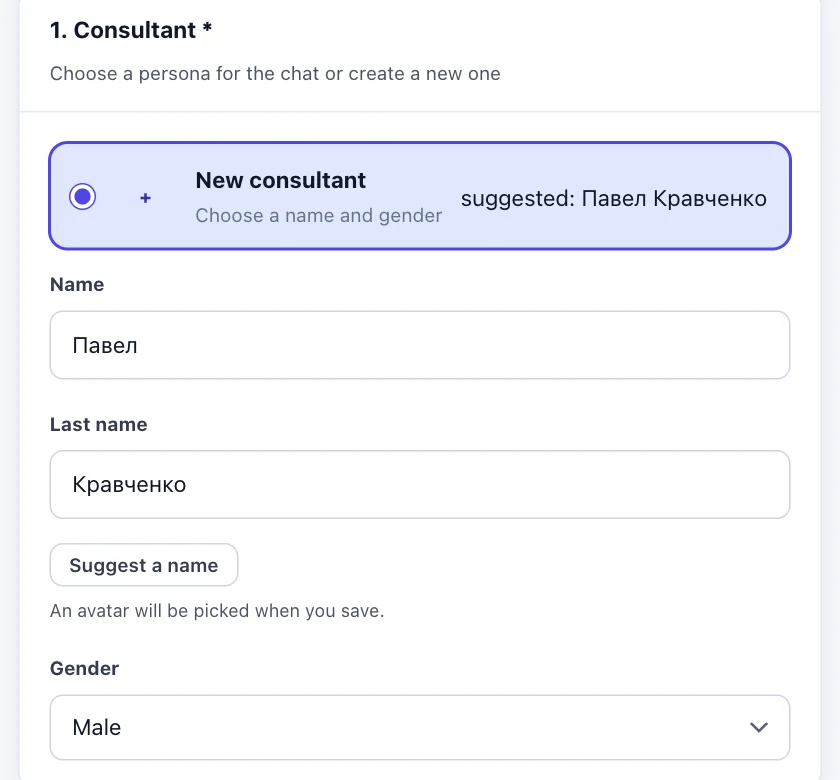
- 1
Describe the consultant
A name, a role and rules in your own words. The wizard fills in the rest.
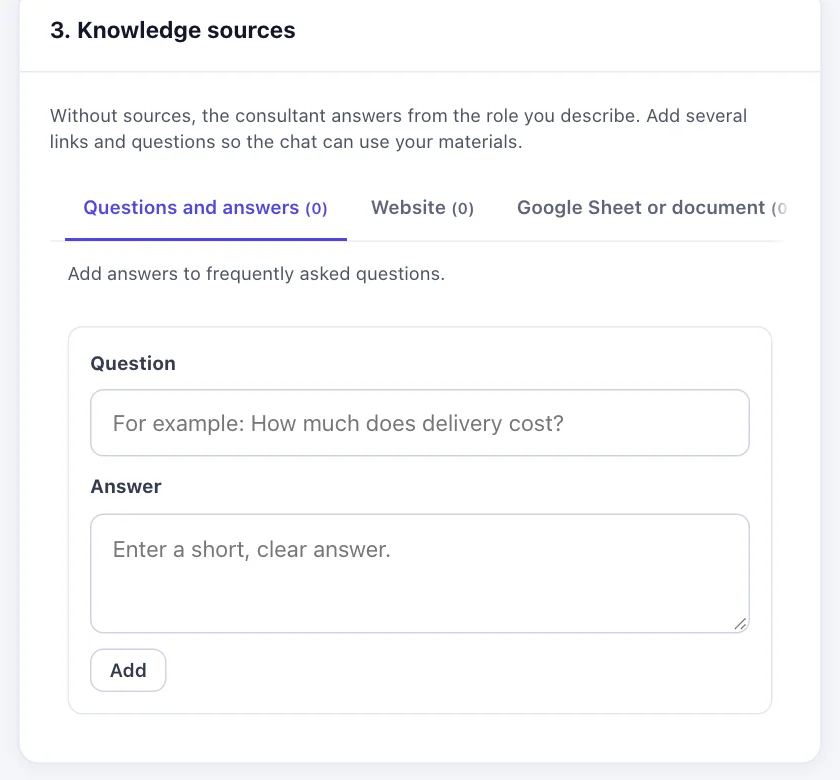
- 2
Add sources
Site, files, sheets, catalogue. Check the answers in preview: it does not start your paid month.
- 3
Put it on your site
One line of code for any site, or a plugin.
<script src="https://kra.name/app/widget.js"
  data-key="wk_…" data-lang="auto" defer></script>

How much it costs
The same chat and the same plan: social networks are included. Tick add-ons and the total updates.
How much is it?
One plan. Tick the add-ons you need and the total updates.
Online chat on your websiteOnline chat for social networks
- 1 online chat: a site widget, a private chat in the panel or your Telegram, Facebook Messenger, Instagram Direct, WhatsApp Business Cloud API, VK
- AI limit: 20M tokens a month per chat (≈ 3,400 replies)
- Unlimited incoming dialogues within the AI limit
- 5 MB knowledge base, any number of sources, refreshed weekly
- Handover to a person, pre-moderation, leads
- Test runs: up to 7 a month
- Secretary: tasks, reminders, a daily report
- Installation on your website, free of charge
- Setup from your Claude or Codex (MCP)
You pay in the panel after registration. Extra storage and token packs are switched on there too.
Free trial
500,000 AI tokens. Without a plan the chat already answers on your site and in messengers: up to 7 replies a day.
Another chat +$15
For another site, language or team, with its own AI limit.
More knowledge +$5
+20 MB a month to the chat’s knowledge base.
Token packs
20M for $10, 50M for $20, 100M for $30, 300M for $60. One-time, never expire. Your own OpenAI or Anthropic key doesn’t use the limit.
What can’t it do?
Read the note on the door before you pay.
- It doesn’t message people first: it answers those who open the chat or write to a connected messenger.
- It doesn’t work in Viber, Discord or LINE.
- It doesn’t know what isn’t in your sources and can be wrong if they contradict each other. That is why there are answer checks and edits.
- It doesn’t change orders or take payments inside the chat window.
- It doesn’t store data in a country of your choice. If the law requires that, write to us before paying.
- Meta may charge for WhatsApp messages beyond its free quota.
A few more questions…
Short answers. Ask the chat at the top for the rest.
Why pay if I can build a similar chat myself?
You can. Then it has to be protected from data extraction, its answers watched and its knowledge kept fresh. $15 a month pays for that ongoing work, not just a window on your site.
Will visitors know it is AI?
By default the chat says that AI is answering. You can change this in settings.
Will it slow my site down?
The script loads deferred. You can start it after the visitor’s first action or with a delay, so it doesn’t affect page load.
Can it promise too much?
In knowledge-only mode the answer is checked against your sources. With no support for it, the visitor sees an honest “I don’t know” and an offer to leave contact details.
When does the paid month start?
With the first message in the chat. Preview during setup doesn’t count.
What happens when the limit runs out?
Buy a one-time token pack or connect your own OpenAI or Anthropic key.
Can I manage it from Claude, Codex or ChatGPT?
Yes, over MCP: consultant, knowledge base, FAQ, look, leads, dialogues and statistics.
Tomorrow night the light can be yours
Upload your materials, ask what your customers ask, and pay only when you like the answers.

You film. The chat replies.
A follower writes a word under your video. The chat replies to the comment, opens a conversation in Direct, hands over what you promised and brings you a lead.
glina.more Comment CLAY, and we’ll send you the guide
oleg_travel So calming to watch
vira.klei I want a blue one like that
Example: the studio and people are invented. In real life followers type freely, there are no buttons.
A comment is raw clay
The word
A comment appears under your video. The chat spots your word among other words, in any letter case.
A public reply
In 45–180 seconds one of your phrases appears under the comment. You set the pause and up to ten phrases.
The first message
The promised thing arrives in Direct: your text with a link to the guide, or an AI message written to your instruction.
The conversation
The person replies and the chat carries on: it answers from your materials and finds out what they need.
The lead
Name, contact and the gist of the talk reach you in Telegram, email, Google Sheets or CRM.
What it does with each comment
Press a comment. You switch the AI’s public replies on yourself and write their instruction.
A reply under the comment and a Direct message.
Short, up to 200 characters: “Thank you! The wheel does that: half an hour and your head is clear.”
From your knowledge base: “Yes, from age seven. A children’s class is $12, clay and firing included.”
Spam. No reason to answer it in public.
An insult. The chat doesn’t argue in public.
Followers are talking to each other. Replies inside threads are off by default; you can turn them on.
One AI reply per author per video, up to 20 an hour by default. Every decision is written to the journal.
Test your word
The same rule the chat uses runs here: case and punctuation don’t matter, but a whole word or phrase must match.
- up to 40
- words and phrases in one rule
- up to 10
- variants of the public reply
- 1 video
- or all posts at once
- 1 s – 1 h
- pause before replying, your choice
Five vessels, one clay
One chat answers everywhere: same knowledge, same manner, shared leads. One account per network.

Keywords in comments and conversation in Direct. You need a professional account, Business or Creator, linked to a Facebook Page.
Facebook Messenger
Messages to your Page. The chat doesn’t handle comments under Facebook posts: invite people to message you.
Telegram
Your bot. Put its link in the channel description or under a post. With add-ons it understands voice messages, photos and documents.
A number in WhatsApp Business Cloud API. A link in your profile leads straight to the conversation. Voice messages need an add-on.
VK
Community messages. The chat doesn’t handle comments under posts.
It works with what you’ve already filmed and written
You point to the sources; the chat finds the answer and says it in its own words. No answer? It says so and offers to take a contact.
- YouTube channel
- titles, descriptions and subtitles, up to 200 videos
- Telegram channel
- public posts, up to 2,000
- Guides and syllabi
- PDF, DOCX, XLSX, CSV, TXT
- Prices and schedule
- Google Docs and Sheets by link, refreshed
- Shop
- products with price and stock from WooCommerce, CSV/XLSX or Google Merchant
- Your own answers
- ready questions and answers, site, Notion

Wash your hands and step in
- You see everything
- Conversations from all networks sit in one panel, translated into English, Ukrainian or Russian.
- You take over
- The AI goes quiet and you reply from the panel. Done? Hand it back.
- You don’t miss leads
- A new lead arrives in Telegram, email, WhatsApp, Slack, Teams, Discord, Google Sheets, Notion, CRM or a webhook.
- You see the use
- Conversations, messages, leads and ratings for each network separately.
What will your word be?
Six invented examples: the word, the conversation and how it ended.
 MENU
Expert
Here is the weekly menu. Is your goal to lose weight or eat regularly?
Lose weight, no diets
a lead for a consultation
 ROUTE
Blogger
Here is the route map. When are you going?
In May, two of us
a lead for a guided trip
 STEP
Coach
The workbook is at this link. What would you like to sort out?
I want to change jobs
a lead for a trial session
 LESSON
Online course
The free lesson is open. Are you starting from zero?
I studied a bit at school
a lead for the spring group
 SLOT
Beauty
Free: Thursday 15:00 and Friday 11:00. Which one?
Friday
a contact for booking
 DRESS
Shop
The blue one is in S and M, $68. What’s your size?
M. Send me the link
a visit to the product
From clay to shelf in four steps
Describe the assistant
A name, role, tone and rules in your own words. The wizard fills in the rest in a chat.
Add materials
Channels, guides, sheets, site. You check answers in preview; it doesn’t start the paid month.
Connect the account
Telegram with a bot token. Instagram and Facebook through your own Meta app; the panel shows each step and the webhook address, and checks the connection.
Set the word
Enter the word, the reply and the Direct message. The panel shows what will fire before the first real comment.
To answer all followers and not only you and your team, Meta reviews the app (App Review). Meta decides how long it takes, so plan ahead. If you’d rather not do it yourself, there is the “Setup and support by specialists” add-on, +$15 a month.

Cracks to know about before you pay
- Meta allows replies only within 24 hours of the person’s last message. After that the chat waits until they write again.
- One private message is sent after a comment, within 7 days. The conversation goes on only if the person replies.
- It doesn’t do broadcasts and doesn’t message people who haven’t commented or written.
- It doesn’t check whether a person follows you.
- In Instagram and Messenger it reads text only. It asks people to describe a photo, voice message or sticker in words.
- It doesn’t reply under TikTok, YouTube, Facebook or VK posts. No Viber, Discord or LINE.
- It doesn’t take payments or keep a booking calendar: it takes a contact and passes it to you.
- Up to 300 new conversations an hour per chat and 40 messages an hour from one person.
- Meta may charge separately for WhatsApp messages beyond its free quota.
Questions before the first video
Will my account get banned?
The chat works through Meta’s official interface and your own app; your account password isn’t needed. Meta still makes the decisions, so follow its rules: don’t promise what you won’t send and don’t ask for comments just to boost reach.
Why is it better than a button bot?
A button bot follows prepared branches. Here people write the way they’re used to; the chat looks for the answer in your materials and can ask what they need.
What if a video takes off?
Comments join a queue and each gets a reply after its own pause. AI public replies are capped by your hourly limit, up to 1,000. Meta has limits too, so in a big spike some replies come later. Every AI reply uses plan tokens.
Can I give different things under different videos?
Yes. Each rule has its own words, posts, reply and Direct message.
Will people know it’s AI?
You decide: the name, tone and rules are yours. We suggest saying it openly in the first message, as in the example at the top.
One chat for the site and social networks?
Yes, for the same $15. The AI limit is shared across all the places where it answers. Separate knowledge or a second Instagram means another chat.
Something still unclear? Ask our working chat.